(오픈소스 분석) Radix Slot
@radix-ui/react-slot 라이브러리 코드를 살펴본다.
용도
<Slot />은 전달된 props를 child에 merge하는 컴포넌트이다.
const a: number = 10;
<Slot onClick={()=>{ console.log('logged second') }}>
  <div onClick={()=>{ console.log('logged first') }}>
    컴포넌트
  </div>
</Slot>
이 특성을 이용해 컴포넌트를 다형적으로 사용할 수 있다.
const Button = ({ asChild, children, ...props }) => {
  const Comp = asChild ? Slot : 'button';
  return (
    <Comp {...props}>
      {children}
    </Comp>
  )
}

// 링크 버튼으로 사용
<Button asChild>
  <a>
    Link Button
  </a>
</Button>

// 버튼으로 사용
<Button>
  Button
</Button>
구현
내부 구현에 사용되는 유틸리티중, mergeProps함수가 핵심이다.
mergeProps의 역할은 다음과 같이 단순화해서 표현 가능하다.
function mergeProps(slotProps, childProps) {
  return { ...slotProps, childProps };
}
그런데 이렇게 하면, slotProps를 childProps가 전부 override하게 되는데, 특정 prop은 override보단 compose하는게 자연스럽다.
// 1. handler
// 두 핸들러가 합쳐지는게 자연스럽다.
<Slot onClick={() => {}}>
  <div onClick={() => {}}>
    ...
  </div>
</Slot>

// 2. style
// 두 스타일이 합쳐지는게 자연스럽다.
<Slot style={{ background: 'red' }}>
  <div style={{ color: 'yellow' }}>
    ...
  </div>
</Slot>

// 3. className
// 두 클래스가 합쳐지는게('slot div') 자연스럽다.
<Slot className="slot">
  <div className="div">
    ...
  </div>
</Slot>
그래서 실제 mergeProps는 위 세 타입의 prop에 대해서는 적절하게 compose하게끔 구현되어있다.
handler
핸들러인지 아닌지는 prop의 이름을 통해서 구분한다. prop의 이름이 onXXX포맷이라면 핸들러가 된다.
slotProp과 childProp모두 동일한 이름의 핸들러가 있는 경우, 두 핸들러를 합친다. 여기서 child의 핸들러가 먼저 실행된다는 점이 중요하며, 이건 내부 구현을 살펴보지 않고선 알 수 없다.
const overrideProps = { ...childProps };

for (const propName in childProps) {
  const slotPropValue = slotProps[propName];
  const childPropValue = childProps[propName];
  const isHandler = /^on[A-Z]/.test(propName);
  if (isHandler) {
      // slot에도, child에도 핸들러가 있다면.
      if (slotPropValue && childPropValue) {
          overrideProps[propName] = (...args) => {
              childPropValue(...args);
              slotPropValue(...args);
              // child가 "먼저" 실행된다는 점에 유의.
              // 모든 prop은 child쪽이 우선순위가 더 높다.
          }
      }
      // slotPropValue에만 핸들러가 있다면.
      else if (slotPropValue) {
          overrideProps[propName] = slotPropValue;
      }

      // 기본적으로 childProps로 오버라이드 되기 때문에 (아래 리턴값 참고)
      // 위 두가지 이외의 경우엔 아무것도 하지 않는다.
    ...
  }

  // childProp
  return { ...slotProps, ...overrideProps }
}
style, className
if (propName === 'style') {
  overrideProps[propName] = { ...slotPropValue, ...childPropValue };
}

if (propName === 'className') {
  overrideProps[propName] = [slotPropValue, childPropValue]
    .filter(Boolean)
    .join(' ');
}
style은 객체 merge를, className은 두 문자열을 ' '로 연결하여 합친다.
ref
ref도 합칠 수 있어야 한다. 이건 composeRefs라는 유틸리티가 수행하는데, radix는 이 유틸리티를 Slot뿐 아니라 거의 대부분의 내부 컴포넌트에 사용하고 있다.
<Slot ref={ref1}>
  <div ref={ref2}>
  </div>
</Slot>
리액트 내장 엘리먼트의 ref prop은 두 가지 방식으로 사용할 수 있는데 하나는 RefObject를 전달하는 것이고, 하나는 RefCallback을 전달하는 것이다.
const divRef = useRef();
<div ref={divRef}>
  ...
</div>

<div ref={(node) => node}>
  ...
</div>
그런데 RefObject를 전달하는 경우도 동일한 역할을 하는 RefCallback으로 바꿀 수 있다.
const divRef = useRef();
<div ref={(node) => {
  divRef.current = node;
}}>
  ...
</div>
ref에 전달한 RefCallback은
리액트 엘리먼트가 DOM에 삽입되었을 때
node가 해당 엘리먼트값이 되어 호출되고리액트 엘리먼트가 DOM에서 제거되었을 때는
node가null이 되어 호출된다.
composeRefs는 전달된 모든 ref를 하나의 RefCallback으로 합치는 함수다.
const composeRefs = (...refs) => {
  return (node) => {
    refs.forEach((ref) => {
      if (typeof ref === 'function') {
        ref(node);
      } else if (ref !== null && ref !== undefined) {
        ref.current = node;
      }
    }
  }
}

const Component = forwardRef((props, forwardedRef) => {
  const divRef = useRef();
  const [node, setNode] = useState();
  const composedRefs = composeRefs(
    divRef,
    (node) => setNode(node),
    forwardedRef
  );

  return (
    <div ref={composedRefs}>
      dd
    </div>
  )
})
Slot
Slot 구현의 일부분은 다음과 같다. 위에서 언급한 mergeProps, composeRefs를 사용한다.
const Slot = forwardRef((props, ref) => {
  const { children, ...slotProps } = props;

  // 중간 코드 생략

  // SlotClone은 slotProps를 children에 합치는 역할이다.
  // ref가 전달된 경우도 children의 ref와 합친다.
  return (
    <SlotClone {...slotProps} ref={ref}>
      {children}
    </SlotClone>
  )
})

const SlotClone = forwardRef((props, ref) => {
  const { children, ...slotProps } = props;

  // children으로 리액트 엘리먼트가 1개 전달된 경우
  // props와 ref가 합쳐진 children을 반환한다.
  if (React.isValidElement(children)) {
    // cloneElement에서 ref를 세팅하려면 prop과 동일하게 두번째 인자에 전달하지만
    // ReactElement에는 props와 ref프로퍼티가 따로 존재한다.
    // 따라서 children Element에서 Consumer가 전달한 ref는
    // children.props.ref가 아니라, children.ref로 꺼내와야 한다.
    return React.cloneElement(children, {
      ...mergeProps(slotProps, children.props),
      ref: ref
        ? composeRefs(ref, children.ref)
        : children.ref,
    });
  }

  // children으로 리액트 엘리먼트가 2개 이상 전달된 경우 Error를 throw
  // 예시
  // <Slot>
  //   <div></div>
  //   <div></div>
  // </Slot>
  //
  // children으로 리액트 엘리먼트가 0개 전달된 경우 null 반환
  return React.Children.count(children) > 1 ? React.Children.only(null) : null;
})
일반적인 케이스에서 Slot은 props를 전달하는 역할만 한다. 구체적인 구현은 SlotClone에 있는데, isValidElement, cloneElement, Children API에 대한 이해만 있다면 어렵지 않게 해석할 수 있다.
제약
여기까지 구현된 Slot은 두 가지 제약이 있다.
children이 엘리먼트 하나여야 한다.Slot에 끼울 엘리먼트는 직계 자식이어야 한다.
예를들어 다음과 같은 시나리오에선, 유저가 원하는대로 루트 엘리먼트의 타입을 바꿀 수 없고, div혹은 button둘 중 하나만 가능하다.
const Component = ({ asChild }) => {
  const Comp = asChild ? Slot : 'button';
  return (
    <Comp {...manyProps}>
      <div>
        {children}
      </div>
    </Comp>
  )
}

<Component asChild>
  <a>children</a>
</Component>

// 위 JSX의 결과
<div>
  <a>children</a>
</div>
이러한 제약을 극복하기 위해 Slottable을 제공한다. Slottable을 사용하면, 위 예시에서 여전히 a를 루트 엘리먼트에 끼울 수 있다.
<Component asChild>
  <a>children</a>
</Component>

// 아래와 같이 변한다.
<a>
  <div>children</div>
</a>
그리고 children이 여러개의 엘리먼트로 이루어진 경우도 동작하게 만들 수 있다.
const Component = ({ children, asChild }) => {
  const Comp = asChild ? Slot : 'div'
  return (
    <Comp>
      <div>Prefix</div>
      <Slottable>
        {children}
      </Slottable>
      <div>Suffix</div>
    </Comp>
  )
}

<Component asChild>
  <a>
    <div>Slottable Children</div>
  </a>
</Component>

// 아래와 같이 변한다
<a>
  <div>Prefix</div>
  <div>Slottable Children</div>
  <div>Suffix</div>
</a>
Slottable
정리하자면
Slot의children은 엘리먼트 하나여야 한다.하지만
Slottable을 직계 자식으로 갖는 경우는 예외로 한다.Slottable의children은 엘리먼트 하나여야 한다. 여러개인 경우,Slot과 동일하게React.Children.only(null)로 에러를 throw한다.
이전에 살펴본 Slot의 구현 부분은 제외하고, 위 요구사항을 충족하는 Slot의 구현 부분을 살펴보자.
const Slot = forwardRef((props, ref) => {
  const { children, ...slotProps } = props;
  const childrenArray = React.Children.toArray(children);
  const slottable = childrenArray.find(isSlottable);

  // 직계 자식으로 Slottable 컴포넌트가 사용되었다면.
  if (slottable) {
    const newElement = slottable.props.children as React.ReactNode;
    const newChildren = childrenArray.map((child) => {
      if (child === slottable) {
        // Slottable의 children으로 여러개의 엘리먼트가 포함되어 있다면 Error.
        if (React.Children.count(newElement) > 1) return React.Children.only(null);
        return React.isValidElement(newElement)
          ? (newElement.props.children as React.ReactNode)
          : null;
      } else {
        return child;
      }
    });
    return (
      <SlotClone {...slotProps} ref={forwardedRef}>
        {React.isValidElement(newElement)
          ? React.cloneElement(newElement, undefined, newChildren)
          : null}
      </SlotClone>
    );
  }

  // 나머지는 이전에 본 Slot 코드 그대로
})

const Slottable = ({ children }) => <>{children}</>

const isSlottable = (child) => {
  return React.isValidElement(child) && child.type === Slottable;
}
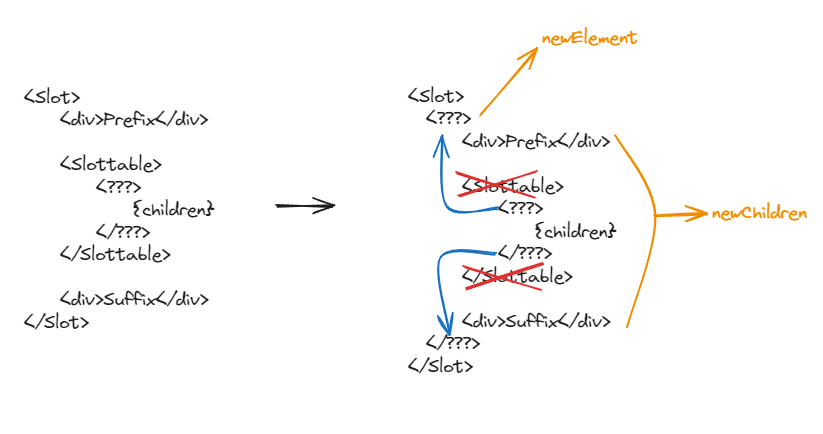
해당 코드가 하는 역할을 그림으로 표현하면 다음과 같다. Slottable이 있는 경우, 다음과 같이 Slottable의 children 엘리먼트 타입이 Slot에 끼워진다. newElement와 newChildren은 실제 코드에서 사용되는 변수에 해당하는 엘리먼트이다.
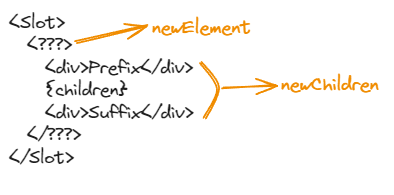
최종적으로 다음과 같은 모양이 된다.
Polymorphic
Polymorphic은 컴포넌트를 다형적으로 사용하기 위해 Slot 이전에 제공되던 유틸리티 타입으로, 현재는 Deprecated된 상태이다.
as prop을 통해 다음과 같이 루트 엘리먼트를 바꿀 수 있고, 타입스크립트를 사용하는 경우 as값에 따라 나머지 props가 적절하게 추론된다. 자세한 사용법은 Docs를 참고하자.
<Component as="a" />
커밋 번호 6f7d460b04782cdfeccc855828881d8f0c4235eb에서 제거되었다. (참고)